
What Is Reverse Lookup?
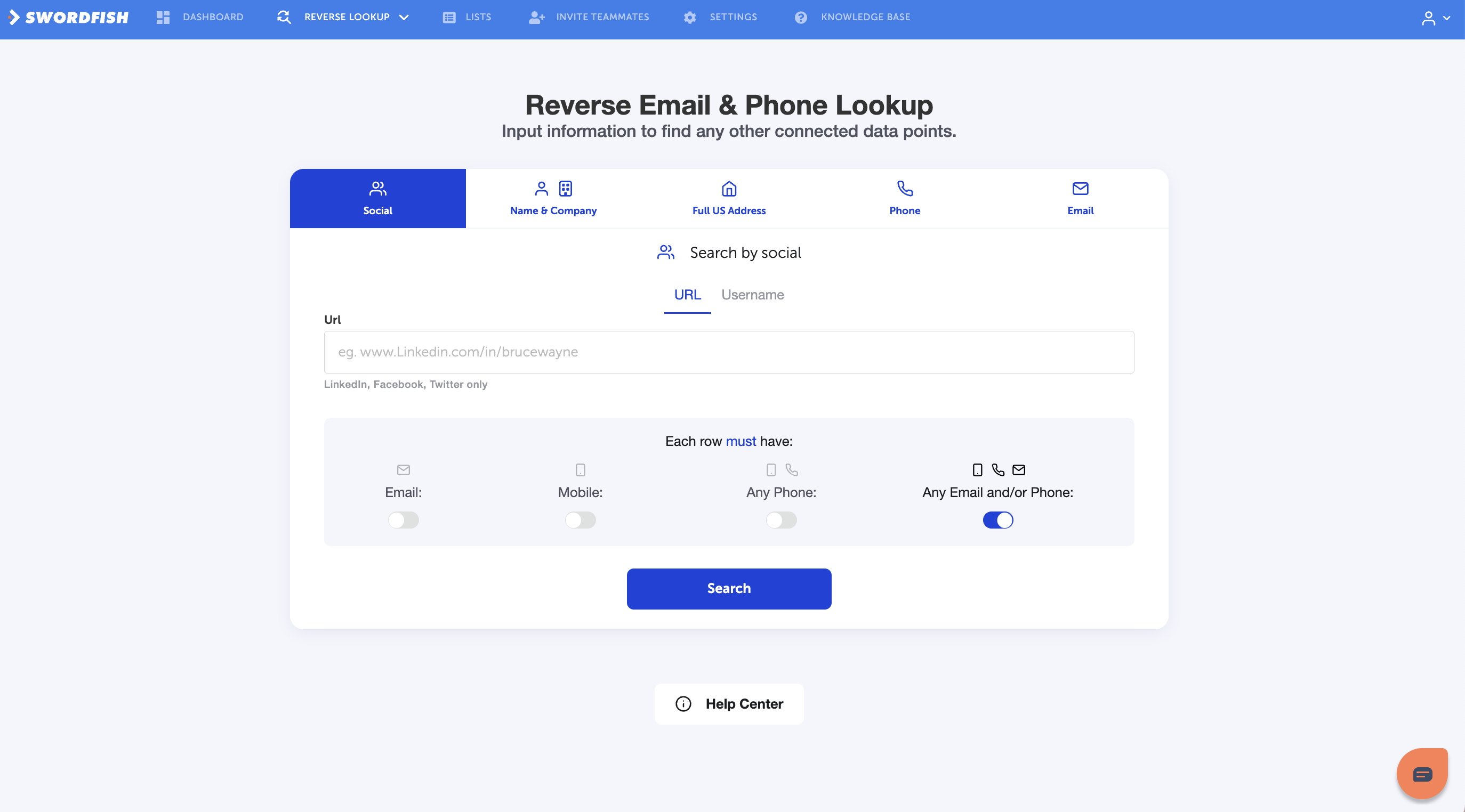
Reverse Lookup lets you input one piece of information about someone—an email address, phone number, social profile, name, or company—and discover their connected data. It's perfect for researching a specific person before outreach, calls, or interviews.
Think of it as deep-diving on a single prospect to uncover their full professional picture.
How Reverse Lookup Works
- Choose a search type — Social, Email, Phone, Name & Company, or Full Address
- Enter the information — Provide the detail you have
- Search — Swordfish finds connected data
- View results — See name, phone numbers, emails, and social profiles
Search Types
Social Search
Search by social profile URL:
- LinkedIn profile — e.g., www.linkedin.com/in/brucewayne
- Twitter/X profile — e.g., twitter.com/brucewayne
- Facebook profile — Limited availability
What you'll find: Name, phone numbers, emails, and social profiles (LinkedIn, Facebook, Twitter).
Email Search
Search by email address:
- Work email — Company email (e.g., bruce@wayne.com)
- Personal email — Gmail, Yahoo, etc.
What you'll find: Name, phone numbers, emails they use, and social profiles (LinkedIn, Facebook, Twitter).
Cost:
- Legacy credit-based plans: 1 credit per search (no charge if no results found)
- Unlimited plans: Counts toward fair use limits
Phone Search
Search by phone number:
- Mobile number — Cell phone number
- Office number — Work phone
What you'll find: Name, email addresses, phone numbers, and social profiles (LinkedIn, Facebook, Twitter).
Cost:
- Legacy credit-based plans: 1 credit per search (no charge if no results found)
- Unlimited plans: Counts toward fair use limits
Name & Company Search
Search by person's name and company:
Required fields:
- First Name (e.g., Bruce)
- Last Name (e.g., Wayne)
- Company (e.g., Wayne Enterprises)
Optional fields:
- Company Website
- Country / State
What you'll find: Name, email addresses, phone numbers, and social profiles (LinkedIn, Facebook, Twitter).
Cost:
- Legacy credit-based plans: 1 credit per search (no charge if no results found)
- Unlimited plans: Counts toward fair use limits
Full US Address Search
Search by home address (US only):
- Street address
- City
- State / Zip code
What you'll find: Name, email addresses, phone numbers, and social profiles (LinkedIn, Facebook, Twitter).
Filtering Results
Once you run a search, you can filter what information you want revealed:
- Email — Toggle to show/hide email addresses
- Mobile — Toggle to show/hide mobile phone numbers
- Any Phone — Toggle to show/hide all phone numbers (office + mobile)
- Any Email and/or Phone — Toggle to show/hide combined contact methods
This gives you control over which data you reveal for each search.
Understanding Results
When Reverse Lookup finds someone, you'll see:
Data returned:
- Name
- Cellphone (primary mobile number)
- Phones (all phone numbers found)
- Emails (all email addresses found)
- Facebook, LinkedIn, Twitter, and other social profiles
No results means:
- We don't have verified data for that person yet
- They may have a very private profile
- You may have entered information that doesn't match our database
Cost:
- Legacy credit-based plans: No charge for searches with no results found
- Unlimited plans: Searches that return no data don't count toward fair use limits
Common Use Cases
Pre-Call Research
- Have someone's phone number? Search it to find their email, company, and LinkedIn before calling
Recruiter Vetting
- Found a candidate on a job board? Search their email or name + company to verify their work history and current employment
Sales Research
- Planning to reach out to someone? Search their email or LinkedIn to gather background intel before your pitch
Lead Verification
- Verify a lead's information before adding them to your CRM—search by email or phone to confirm their company and title
Finding Hidden Contact Info
- Have someone's LinkedIn but need their email? Search their LinkedIn URL to find it
Data Quality
Every result in Reverse Lookup has been verified:
- Emails: 95%+ accuracy, verified as deliverable
- Phone numbers: ~80% accuracy globally (higher in North America), verified as active
If a search returns no data, it means we don't have verified information yet for that person.
Reverse Lookup vs Prospector
Reverse Lookup: Perfect for researching one specific person. Input what you have (email, phone, name) and get their full profile.
Prospector: Perfect for finding many people at once. Set filters (job title, company, location) and build an entire list.
Use them together:
- Use Prospector to build a list of prospects
- Use Reverse Lookup to deep-dive on specific people from that list
Pro Tips
- Start with what you have — If you have an email, search by email. LinkedIn? Search by social. Name? Use Name & Company
- Use multiple searches — Have someone's name but no email? Search by name + company first, then use the email you find for another search to confirm details
- Verify before outreach — Always run a Reverse Lookup before cold emailing or calling someone to confirm their current company and role
- Combine with Chrome Extension — Found someone on LinkedIn? The extension shows reverse lookup data automatically
Troubleshooting
"No results found for this email"
- The email may not be in our database
- Try searching by name + company instead
- Contact support@swordfish.ai if you believe we should have this person's data
"I'm getting someone else's data"
- Double-check the email/phone/name you entered—typos matter
- If you're confident it's wrong, reach out to support@swordfish.ai to report it
"Why can't I search by last name only?"
- Last names alone are too broad and often match many people
- Always include first name, or use Name + Company for more accurate results
"Can I search international phone numbers?"
- We support global phone number searches, but accuracy is higher in North America
- If you have limited results internationally, try searching by email or LinkedIn instead
Getting Started
Ready to try Reverse Lookup?
- Go to Reverse Lookup (Data Tools menu)
- Choose your search type (Social, Email, Phone, Name & Company, or Address)
- Enter the information you have
- Click Search
- View results and export or integrate with your CRM
Questions? Contact support@swordfish.ai or use the live chat in your dashboard.